How to Stream GTA 6 on Launch Day: Console, Capture Card and Overlay Setup
GTA 6 launches on consoles only. Built-in broadcast or capture card, the PS5 HDCP switch, OBS setup and an overlay layout that keeps the game's HUD clear.

GTA 6 is shaping up to be the biggest streaming day of the year, and it launches on consoles only. If you usually stream from a PC, that changes your setup. This guide covers what is confirmed, the two ways to stream from a console, the capture card route step by step, and how to lay out an overlay for an open-world game — so launch day is spent playing, not troubleshooting.
What is confirmed
As of September 2026, Rockstar has confirmed:
- Release date: November 19, 2026.
- Platforms: PlayStation 5 and Xbox Series X|S. A PC version has not been announced.
- Pre-load: digital pre-orders can start downloading from local midnight on November 12.
Dates can move, so check Rockstar's official channels in the week before launch. The practical point for streamers is the pre-load window: the game is on your console a week early, which gives you time to test your whole setup.
Two ways to stream from a console
| Built-in console broadcast | Capture card + OBS on a PC | |
| Setup | A few minutes from the console menu | A capture card, a PC and an hour for the first setup |
| Custom overlay, alerts, chat on screen | Very limited | Full — anything that works as an OBS source |
| Scenes (Starting Soon, BRB, Ending) | No | Yes |
| Best for | A quick test or a casual stream | A channel that wants to look like itself on launch day |
If you already have an overlay, alerts and screens you like, the capture card route is the one that keeps them.
Capture card setup, step by step
- Cable it: console HDMI into the capture card's input, the card's pass-through output into your TV or monitor, and the card into your PC by USB (or into a PCIe slot for an internal card).
- PS5 only — turn off HDCP. Go to Settings → System → HDMI and switch Enable HDCP off. With it on, the capture card receives no picture. Elgato's support documentation gives the same path.
- Add the card in OBS: Sources → + → Video Capture Device, and pick your capture card.
- Add the audio: depending on the card, game audio comes in with the video source or as a separate audio input. Check the OBS audio mixer — if the game bar is not moving, add the card as an Audio Input Capture.
- Play on the TV, not the OBS preview. The preview on your PC is delayed. Pass-through keeps your own screen lag-free.
- Do a test stream during the pre-load week with any console game. Check picture, game audio, microphone levels and that your alerts fire.
If your overlay is a browser source, the setup from adding an overlay to OBS applies unchanged — the capture card is just one more source under it. If something does not show up, work through this checklist.
Laying out an overlay for an open-world game
Open-world games put information in the corners of the screen: a map, status, money, prompts. An overlay that covers those makes the stream harder to watch, and viewers notice.
- Keep the game's HUD corners clear. On launch day, take a screenshot of the game and check where it draws its interface before you place a webcam or chat box.
- Use a light layout while playing. A thin frame, a webcam and small labels. Save the full frame with chat and panels for talking segments.
- Put chat on the side, not over the picture. A vertical chat along one edge takes space from the least important part of a 16:9 image.
- Make the scene switch easy. Bind your gameplay and Just Chatting scenes to hotkeys. Launch streams are long and you will switch a lot.
Game music and VODs
Open-world games often have radio stations full of licensed music, and that is where muted VODs come from. Twitch's own guidance is to check the game's end user licence agreement for what it says about streaming music, and adds that some games let you turn music off while streaming. If you are not sure, you can mute the game music yourself or turn off VODs and Clips for that stream.
The practical version: look for a streamer-mode or licensed-music option in the game's audio settings on launch day. If there is none, lower the music volume in the game and keep dialogue and effects.
Scenes to prepare before November 19
- Starting Soon — put your start time on it. Launch-day viewers arrive early.
- Be Right Back — you will need it; launch streams run long.
- Stream Ending — when you are next live and where to follow you. A raid usually happens over this screen.
More on each in Stream Screens Explained.
A look that matches the setting
The game is set in a sunny, neon-lit southern city, and the matching look is 80s neon: sunsets, palm trees, glowing skylines, pink and cyan. It is a look that also outlives launch week, because it fits any late-night or retro-styled stream.
Our Retro Miami City Stream Overlay Pack is built in that style — and built for exactly the layout problems above:
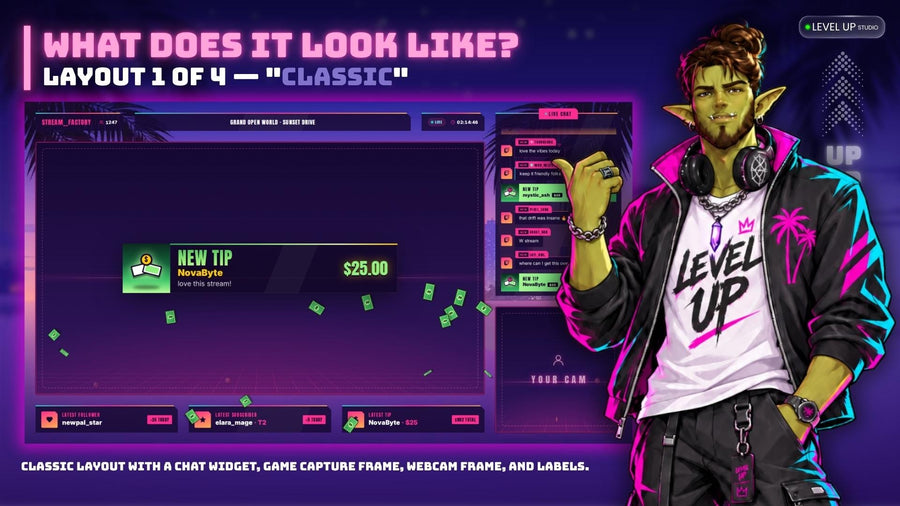
- Four layouts — Classic, Focus, Just Chatting and VTuber BG. Use Focus while playing and Just Chatting between sessions.
- Your chat drives into the scene — chatters pull into the lot in their own car or sail into the bay with their name above it, and can type !car, !honk and !leave.
- A living city — sunrise, sunset and moonrise, city lights, planes, helicopters and yachts.
- Screens, alerts and chat included — Starting Soon, Be Right Back, Stream Ending and Offline in three locations, alerts for eight events, and a vertical chat with a 3D tilt.
- Eight colour presets, one-click install into StreamElements, and every text editable. Made for Twitch.
If you only want part of it, the Retro Neon City vertical chat is available on its own, and the rest of the neon range is in the neon collection.
Grand Theft Auto and GTA are trademarks of Take-Two Interactive Software. Level UP Studio is an independent studio and is not affiliated with or endorsed by Rockstar Games or Take-Two. Our overlays are original artwork and contain no game assets.